




Understanding HubSpot (Breeze) Credits: What You Need to Know
In June 2025, HubSpot introduced a unified usage-based billing model called HubSpot Credits (formerly known as Breeze Credits). This credit-based system powers AI-driven features like Breeze Intelligence (data enrichment) and Customer Agent. Here’s a breakdown of how it works, why it matters, and how you can get the most out of it.
- What are HubSpot Credits?
- Important Points to Note
- What features consume HubSpot Credits?
- Best Practices for Maximizing Credit ROI
- Real-World Scenarios: How Businesses Use HubSpot Credits
- Tracking and Billing of HubSpot Credits
What are HubSpot Credits?
HubSpot Credits are a usage-based, pay‑as‑you‑use model introduced on June 2, 2025, replacing the older “Breeze Credits” system. They serve as the internal currency you spend when using features like AI-powered data enrichment, customer support automation, smart properties, and buyer intent tools. These credits are consumed per action, and each HubSpot subscription tier includes a monthly allocation.
Monthly Credit Allocation by Tier
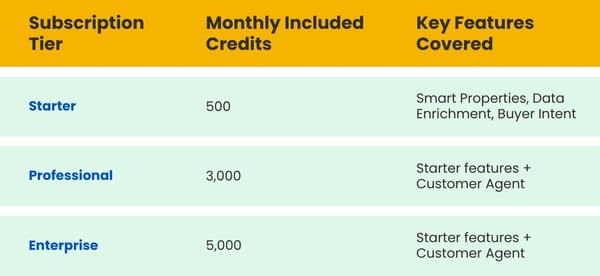
* Note: When subscribed to multiple Hubs, your credit allocation is based on the highest-tier product.
Important Points to Note
HubSpot Breeze Credits are used to access certain usage-based features in HubSpot, such as Customer Agent, Breeze Intelligence, and more. These credits are part of your HubSpot subscription, and it's important to know how they work so you can manage your usage and avoid any unexpected charges.
Let’s break down how Breeze Credits work:
1. How is the monthly allocation of credits?
- Every month, you receive a set number of HubSpot Credits based on your plan.
- For example, an Enterprise customer may get 5,000 credits per month as part of their subscription.
2. How do credits reset monthly?
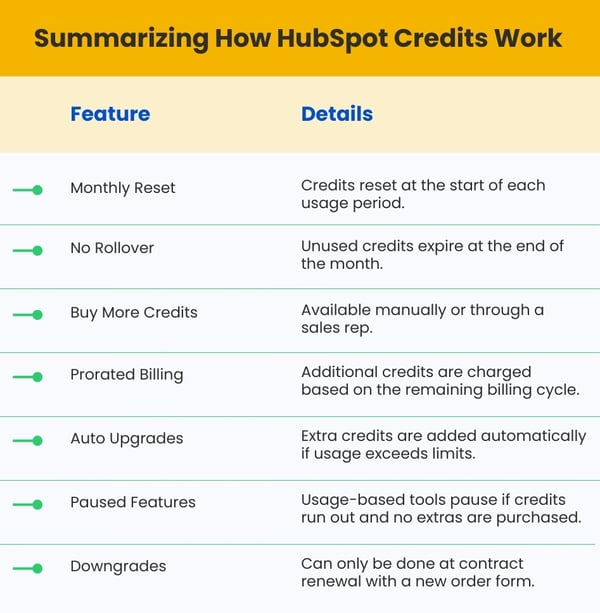
- Your HubSpot Credits reset on the first day of your monthly usage cycle.
- This means any unused credits do not roll over to the next month — they simply expire.
- It’s a "use-it-or-lose-it" system.
3. What happens when you use all your credits?
If you use all your included credits in a month, you have two choices:
- Buy More Credits Manually
- You can go to Account & Billing in your HubSpot account and purchase additional credit packs.
- You can also contact your HubSpot sales rep to do this.
- The extra credits are added immediately, and the charges are prorated to fit the remaining time in your current billing period.
- Don’t Buy More – Features Pause
- If you decide not to buy more credits, any features that rely on them (like Breeze Intelligence or Customer Agent) will pause until:
- Your next monthly reset date, or
- You decide to purchase more credits.
- If you decide not to buy more credits, any features that rely on them (like Breeze Intelligence or Customer Agent) will pause until:
4. Does HubSpot provide automatic credit upgrades?
HubSpot also offers automatic upgrades for high-usage situations:
Let’s say:
- Your monthly limit is 5,000 credits.
- You buy an additional 1,000-credit pack, giving you 6,000 credits in total.
- But in a particular month, you use 6,500 credits.
In this case:
- HubSpot will automatically add another 1,000-credit pack to your subscription.
- Your new monthly limit becomes 7,000 credits, and that remains for the rest of your contract period.
- This helps ensure your features don’t suddenly stop due to overuse.
5. Can we manage or remove extra credits?
If you’ve added extra credit packs and later want to reduce them:
- You can downgrade at your next renewal date.
- This means you’ll need to sign a new order form, and the changes will take effect after your current contract ends.
What Features Consume HubSpot Credits?
HubSpot Credits power multiple advanced tool sets. Here’s how usage breaks down:
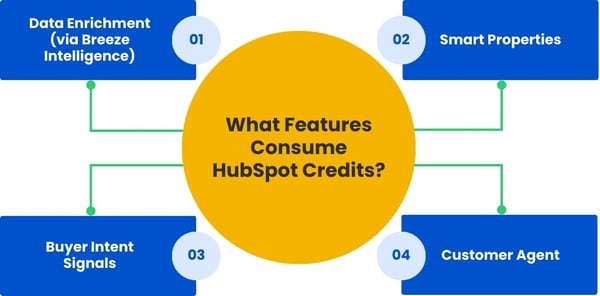
1. Data Enrichment (via Breeze Intelligence)
Automatically fills in missing contact or company data: industry, job title, size, revenue, etc.
- Enrich each contact or company record: 10 credits
- Enrich individual smart properties per record: 10 credits
2. Smart Properties
AI-generated properties (e.g. tech stack, buyer persona) auto-fill CRM fields.
- Automatically generate AI-based property values (e.g., “industry”, “tech stack”) using public web data: 10 credits per record
3. Buyer Intent Signals
Detects companies interacting with your site or content and adds them to HubSpot.
- Identify high-intent companies visiting your site or researching relevant topics: 10 credits per company added
4. Customer Agent
Manages customer messages via chat or email using AI powered by your content.
- AI-powered support agent that handles chat/email inquiries (ends after 24h inactivity or 72h email threads): 100 credits per conversation
Best Practices for Maximizing Credit ROI
1. Pilot Strategically
Start with select, high-impact areas:
- Customer Agent: Roll out on bottom-of-funnel pages or billing/FAQ touchpoints. Capture resolution rate, conversational load reductions, and cost-per-resolution.
- Enrichment Features: Focus on key segments or high-value records before scaling across your entire database.
2. Optimize Content to Fuel AI Effectiveness
Robust Knowledge Base is essential for maximizing Customer Agent performance. It should include:
- Complete, structured FAQ or documentation content spanning all funnel stages (ToFu, MoFu, BoFu)
- Content organized for machine parsing using frameworks like CLEAR (structured data, schema markup, logic, benefits)—to empower accurate AI responses
3. Track, Analyze & Adjust Regularly
- Continuously monitor credit usage per feature via HubSpot’s Usage & Limits tools.
- Identify which features drive the best ROI (e.g., high-resolution rates, reduced support tickets per credit consumed).
- Refine or pause features with poor performance to reallocate credits toward higher-impact areas.
4. Plan for Scalability & Growth
- Build a roadmap for how credit usage will grow over time, especially if traffic, support demand, or the size of the contact database expands.
- Opt for larger credit packs proactively if forecasting high ROI—rather than letting HubSpot auto-upgrade and pay premium.
Real-World Scenarios: How Businesses Use HubSpot Credits
1. Scenario A: Marketing Automation with Smart Enrichment
A SaaS business imports cold leads and uses Breeze Intelligence to enrich contact fields like job title and company size. This data enables better segmentation and lead scoring.
2. Scenario B: Customer Agent at Work
A mid-sized company uses Customer Agent to answer common service questions. AI handles chats, provides descriptions about the various offerings, and escalates the complex queries.
3. Scenario C: Buyer Intent for ABM
A B2B brand uses Buyer Intent to identify companies visiting pricing pages. Retrieves contact signals and adds them for targeted outreach, fueling its ABM funnel.
Tracking and Billing of HubSpot Credits
1. Monitor Monthly Usage
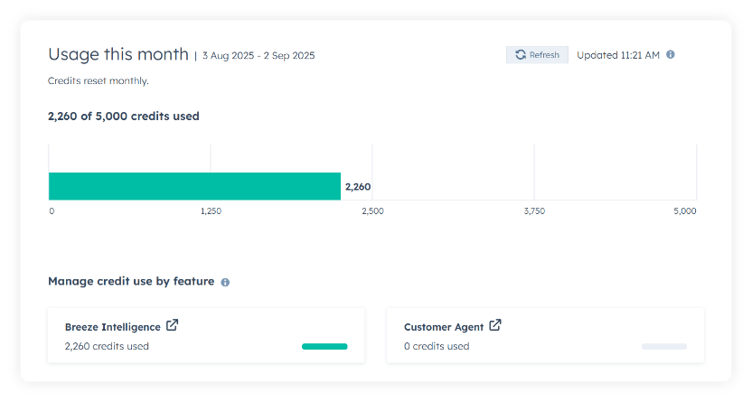
Use Account & Billing → Usage & Limits → HubSpot Credits in your portal. You can view:
- Your credits
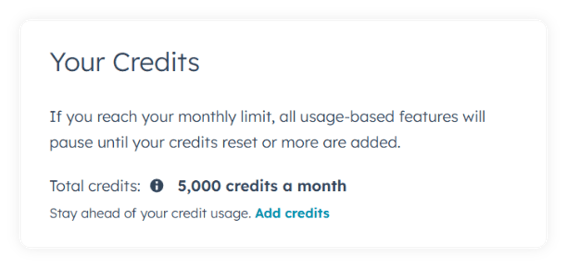
- Usage breakdown by feature (Customer Agent, Enrichment, Buyer Intent)
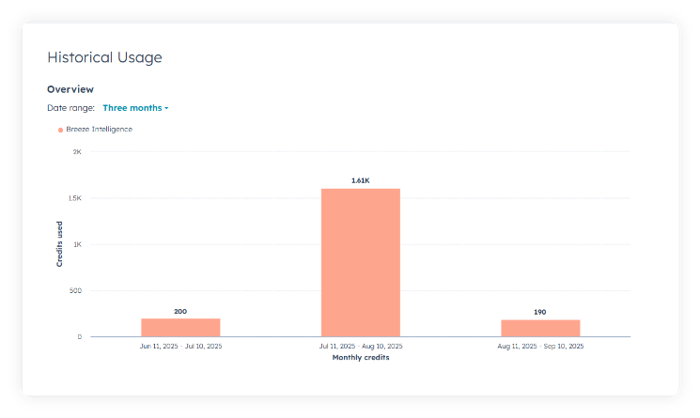
- Historical logs with per-action costs
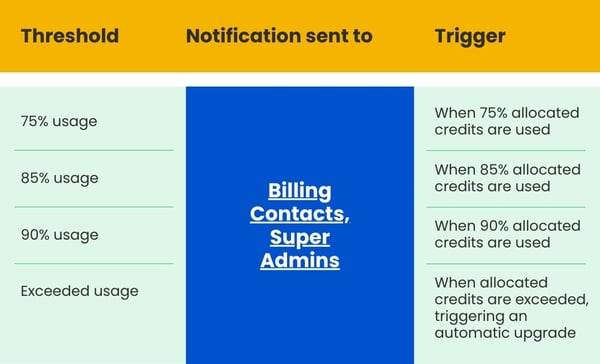
2. Set up alerts at usage thresholds:
Global banners and notification emails will be triggered when usage thresholds are reached. These alerts help you stay proactive in managing your account and prevent unexpected upgrades.
3. Billing & Upgrades
- Auto - Upgrade - If usage exceeds limit new credit pack of 1,000 units (~$10) is added, prorated for current billing cycle and continues until renewal.
- Cancel or Downgrade - HubSpot Credits tiers can only be canceled or downgraded at the end of your contractual term. You must contact the HubSpot Support team prior to the renewal date.
- Access - Only Paid Seat or Partner Seat users can access credit‑based features, and not Free or View‑Only Seats.
Best Practices Checklist
- Monitor credit usage every month
- Limit Smart Property and enrichment usage to trained users
- Pilot Customer Agent before full deployment
- Forecast credit consumption based on projected usage
- Set roles and permission governance
- Use alerts to stay under limits
Conclusion
HubSpot Credits mark a significant evolution in how businesses invest in the platform, shifting from flat subscriptions to a more flexible, usage-based pricing model. This change not only aligns costs more closely with the actual value delivered but also opens the door to powerful, AI-driven capabilities such as:
- Data Enrichment - ensuring cleaner, more actionable customer records
- Customer Support Automation - scaling service delivery without adding headcount
- Buyer Intent Insights - helping sales and marketing teams focus efforts where they matter most
However, with this flexibility comes responsibility. Credits need to be carefully managed within a governance framework to avoid unexpected costs. A strategic, phased approach to implementation ensures that your team gets maximum value while staying within budget.
The good news is that HubSpot provides transparent tools to monitor and track credit usage. However, success depends on pairing these tools with smart usage planning, ongoing oversight, and regular reviews. Done right, the return on investment can be phenomenal.